
AI Autocompletion
This article introduces AI Autocompletion in Oxygen XML Editor 28.0 and explains how inline, context-aware suggestions help XML developers work faster with structured technologies.
Starting with Oxygen XML Editor 28.0, you can use AI Autocompletion together with the Oxygen AI Positron add-on to get real-time, context-aware suggestions directly at the caret position in Text mode. The feature reduces repetitive typing, speeds up authoring, and helps you keep structures consistent in technologies such as XSLT, XSD, JSON Schema, Schematron, and others.
What AI Autocompletion brings to the editor
AI Autocompletion is integrated into the existing editing experience. Suggestions appear inline in the Text editing mode, so you do not need to switch to another panel or dialog.
As you type, Oxygen AI Positron evaluates the local context and proposes completions such as:
- Code fragments
- Schema constructs
- XPath expressions
- Comments
- Enhancements based on nearby content
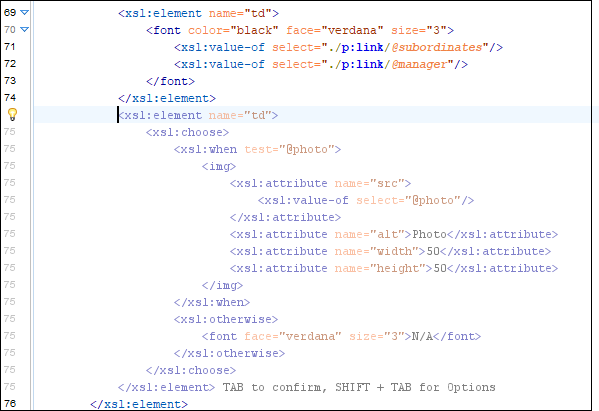
The suggestions are rendered with a subtle shaded gradient so that you can clearly distinguish them from the text you have already entered, while keeping the experience lightweight and non-intrusive.
How it works
AI Autocompletion operates in Text editing mode and reacts to what you type. When Oxygen XML Editor detects that you have entered a new line, it requests a suggestion from the configured AI model and displays it inline at the cursor position.
You can use it in two ways:
Real-time inline suggestions – The feature proactively proposes completions while you type. When a suggestion appears, you can either accept it or keep typing to ignore it.
-
On-demand via the Autocomplete action – You can explicitly trigger autocompletion using the Autocomplete action. In this case, the generated result is also shown in the AI chat view, where you can inspect the action and refine the output further if needed.
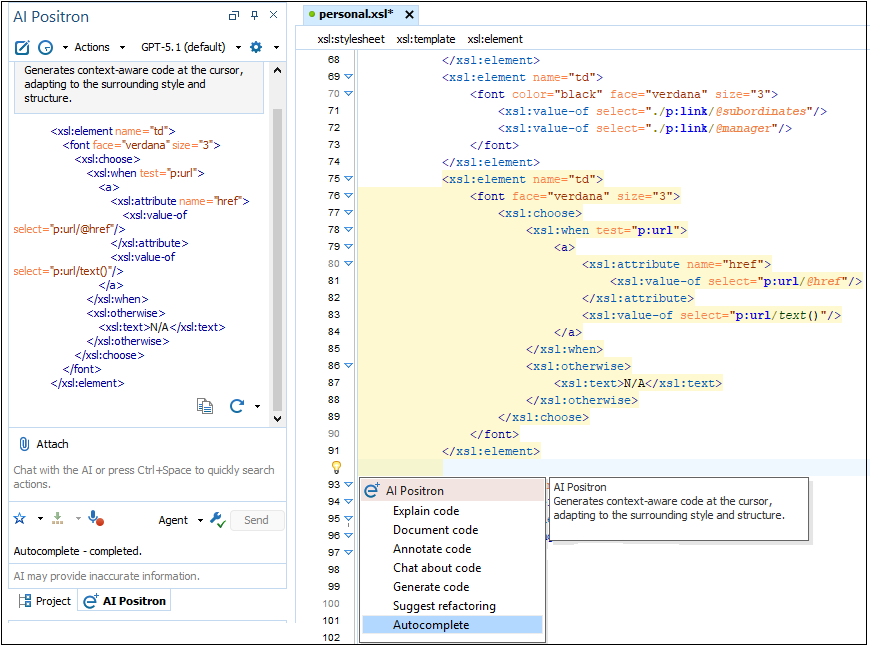
This dual model supports both lightweight inline completion and more deliberate AI-assisted editing workflows.
Example workflow in XSLT
Consider an XSLT stylesheet where you have already defined several templates that match elements in a book structure. When you start writing a new template for chapter/section in Text mode, AI Autocompletion can:
- Propose a new xsl:template skeleton that mirrors the patterns of your existing templates.
- Suggest common xsl:apply-templates or xsl:value-of instructions based on nearby code.
- Fill in typical attribute values or XPath expressions that match the surrounding context.
You remain in full control of the final code, but you spend less time typing boilerplate and more time refining the transformation logic.
Accepting suggestions is effortless
The interaction model is simple and designed not to interrupt your editing flow:
- Press Tab to accept the current AI suggestion.
- Press Shift+Tab to open the AI Autocompletion Preferences dialog.
- If the suggestion is not useful, continue typing and the AI adapts. You do not need to explicitly dismiss the suggestion.
AI Autocompletion is assistive, not disruptive. It offers completions when they are helpful, but it never forces you to change your current workflow.
Why context awareness matters
AI Autocompletion adapts to the current file content and structure. Suggestions are generated from the live editing context, not from a static library of snippets.
The more context the model can see, the better the completions become. This is especially useful when you work on projects where:
- XSLT templates evolve iteratively.
- XML schemas are built and refined incrementally.
- Schematron rules depend on the structure of the documents they validate.
- JSON Schema definitions must remain internally consistent across multiple files.
As the surrounding content grows, the AI can propose structural patterns and refinements that better match your current intent.
Limitations and best practices
AI Autocompletion is a productivity aid, not a replacement for your expertise. Keep the following in mind:
- Always review suggestions for correctness, performance, and style before accepting them.
- For very large files, suggestions may focus on the most relevant nearby context rather than the entire document.
- If your project contains sensitive or confidential information, make sure your AI configuration complies with your organization's data handling policies.
Supported file types
AI Autocompletion is optimized for several key editor types in Oxygen XML Editor:
- XSLT – templates, functions, and XPath expressions.
- XSD – schema components, type definitions, and constraints.
- JSON Schema – object structures, keywords, and property patterns.
- Schematron – rules, assertions, and diagnostics.
- Other – available for other documents such as DTD, XQuery, XProc, HTML, CSS, and more.
These technologies benefit strongly from assistance with repetitive syntax and structural correctness, which makes them ideal candidates for AI-powered completion.
Preferences that give you control
Oxygen XML Editor exposes a dedicated set of preferences so that you can control
how AI Autocompletion behaves. For detailed configuration instructions, see the
online documentation: AI Autocompletion Preferences.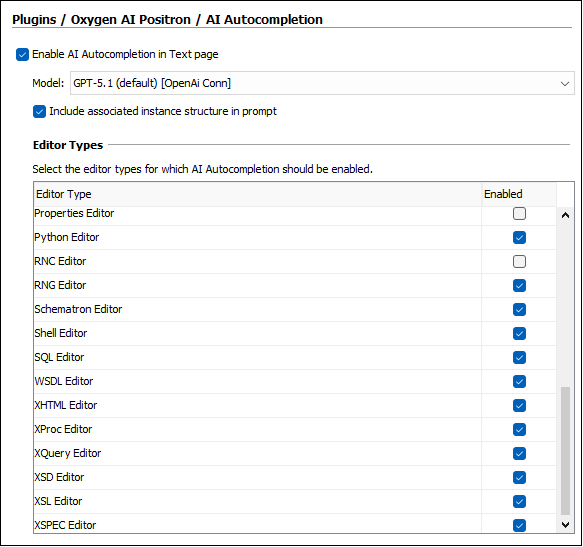
Enable AI Autocompletion in Text page
This option turns on context-aware suggestions in supported editors when you work in Text mode.
Model
The Model setting lets you choose the AI model used for autocompletion. Different models consume different numbers of credits per token, so this choice helps you balance suggestion quality, speed, and usage cost.
Include associated instance structure in prompt
This option controls whether Oxygen XML Editor includes instance structure when building the prompt for the AI model.
When enabled, the additional context is derived from existing scenarios:
- For XSLT and XQuery, it uses the structure of the XML document associated in the transformation scenario.
- For schemas such as XSD, Schematron, DTD, and RNG, it uses the structure of the instance document associated in a validation scenario.
If your transformation or validation setup already encodes useful document relationships, this option allows AI Autocompletion to use that information to produce more accurate and context-aware suggestions.
Editor types
A dedicated table lists the supported editor types and lets you choose exactly where AI Autocompletion should be active. This level of control is useful for teams who want AI assistance in some technologies but not in others.
Practical tip: use it for structure, not just syntax
AI Autocompletion is most effective when you use it to generate structural fragments that match your current editing intent, not only to finish tags or keywords.
For example:
- In XSLT, it can help create a template, complete a template body, or suggest relevant XPath-based constructs that align with nearby templates.
- In XSD, it can accelerate common type and element definition patterns that match the surrounding schema design.
- In Schematron, it can assist with assertions and quick fixes that follow the context of the current rule and the associated instance structure.
This makes AI Autocompletion particularly effective for experienced users who know what they want to build but want to spend less time typing.
Conclusion
AI Autocompletion in Oxygen XML Editor 28.0 brings inline, context-aware suggestions directly to the caret position, integrates with on-demand Autocomplete actions, and offers editor-specific configuration options. For users already relying on Oxygen AI Positron, it is a natural extension that amplifies expertise and improves productivity in real-world structured authoring and transformation workflows.