
S1000D 4.x Built-in Support
Oxygen XML Editor version 28.1 provides built-in S1000D 4.x support, enabling authors to create, validate, and visually edit S1000D content with BREX-to-Schematron conversion and Smart Paste capabilities.
S1000D® is the international standard for technical publications in aerospace, defense, and other asset-intensive industries.
Previously, setting up a robust S1000D editing environment in Oxygen XML Editor often required custom frameworks, partner solutions, or extensive manual configuration.
Oxygen XML Editor version 28.1 changes this with native S1000D 4.x support. You can now author, validate, and visually edit S1000D content out of the box, including BREX editing and conversion, plus migration-friendly Smart Paste.
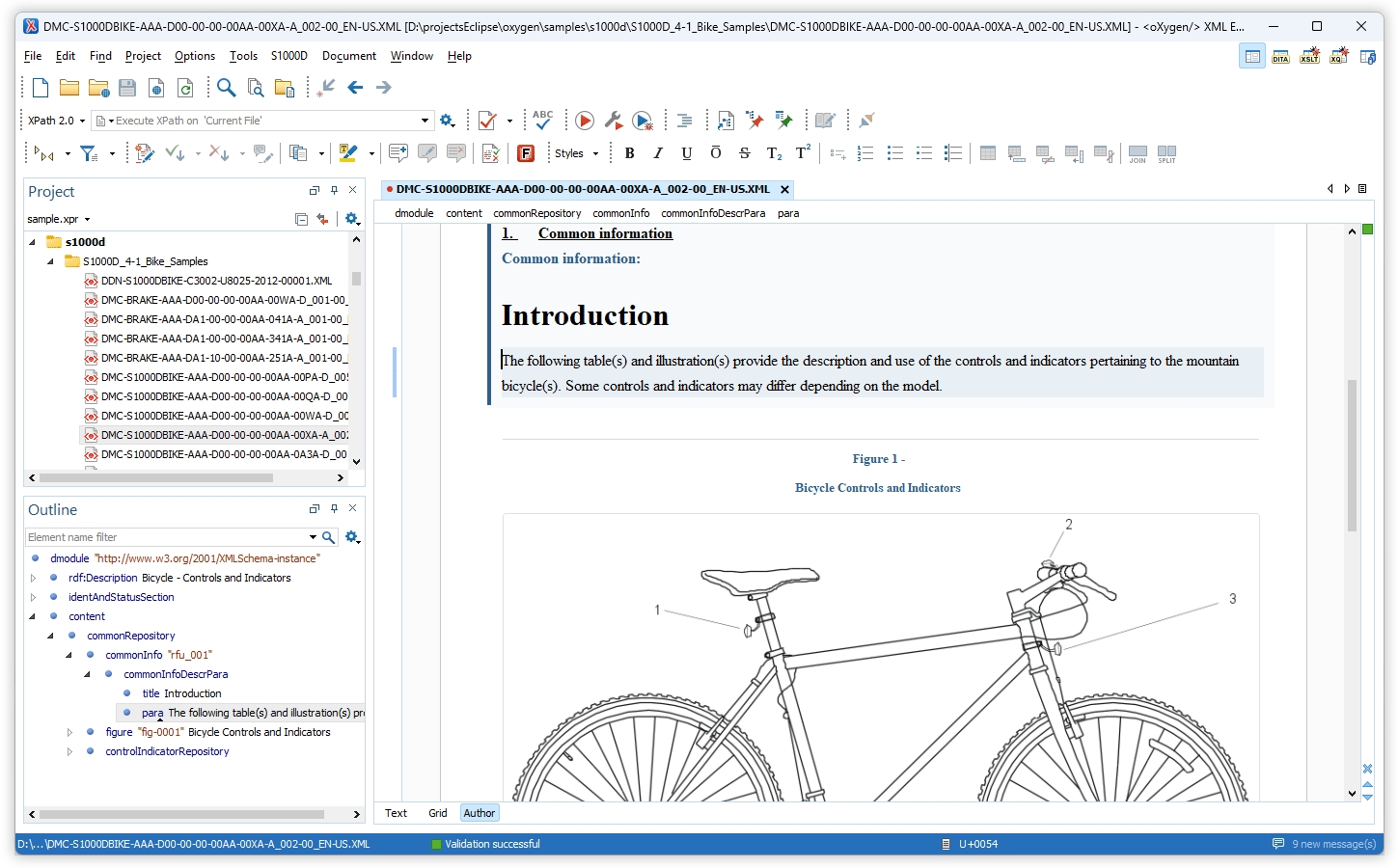
This article explains the new features and why they matter for anyone who manages a CSDB or writes data modules regularly.
Out-of-the-Box S1000D
Oxygen XML Editor now includes a dedicated S1000D framework for issues 4.0, 4.1, and 4.2 of the S1000D specification.
Ready-Made Document Templates
When you create a new document from templates, you will find S1000D-specific entries for:
- Data Modules (DMs)
- Publication Modules (PMs)
Choosing a template provides a correctly structured skeleton document with the appropriate issue-specific namespaces and required elements. This means:
- No need to copy existing DMs just to get the boilerplate structure.
- Consistent, valid starting points across your authoring team.
Schema-Guided Editing and Validation
S1000D requires strict adherence to the schema. Oxygen XML Editor supports this by providing:
- Full schema-guided editing for DMs, PMs, and BREX modules
- Real-time validation
- Context-aware content completion
As you type, Oxygen XML Editor offers only elements and attributes that are valid at the current cursor position, based on the corresponding issue's XSD. This is particularly helpful when working with:
- The Identification and Status section of a data module
- Complex structures in the content section, such as procedures, warnings, and figures
- PM constructs that control inclusion and sequencing of DMs
Built-in Documentation for Elements and Attributes
When you trigger content completion, Oxygen XML Editor displays inline documentation for S1000D elements and attributes:
- Tooltips in the Content Completion list
- Detailed help in the Attributes view
This provides a quick reference to the specification embedded in your editor—ideal for authors who understand XML but are still learning S1000D semantics.
Visual Authoring Tailored to S1000D
You can edit S1000D documents in Author mode using layouts optimized for technical publications:
- Full-width: Best for day-to-day authoring with maximum screen space.
- Print preview: Shows a pagination-oriented layout similar to a delivered publication.
- Large-font: Helpful during review sessions or on high-resolution displays.
Rich-Text Actions Mapped to S1000D Markup
The Author toolbar provides S1000D-aware formatting controls. Instead of inserting
generic <emphasis> tags, Oxygen XML Editor inserts the
correct S1000D elements and attributes:
- Bold →
<emphasis emphasisType="em01"> - Italic →
<emphasis emphasisType="em02"> - Underline →
<emphasis emphasisType="em03"> - Overline →
<emphasis emphasisType="em04"> - Strikethrough →
<emphasis emphasisType="em05"> - Subscript →
<subscript> - Superscript →
<superscript>
Lists and tables are also created and managed using dedicated actions:
- Insert sequential or random lists (simple or unordered).
- Insert definition lists.
- Insert and configure tables (header/footer, rows/columns, frame).
- Add or delete rows and columns, and join or split cells.
These actions generate schema-compliant S1000D structures, allowing authors and subject matter experts to work visually without sacrificing validity.
BREX-Aware Workflows
BREX (Business Rules Exchange) modules are the enforcement layer for your project's specific S1000D implementation. Oxygen XML Editor now provides support to:
- Edit BREX in Text or Author mode with schema-guided completion and validation.
- Use the same Author-mode conveniences while defining or updating business rules.
From BREX to Schematron
You can convert BREX modules to Schematron using the "S1000D BREX to Schematron" built-in transformation scenario. This enables several powerful workflows:
- Integrate BREX-derived rules into your continuous integration or build pipeline.
- Run Schematron-based checks as part of Oxygen XML Editor's validation phase, alongside XSD validation.
- Maintain a single source of truth: edit business rules in BREX, then regenerate Schematron whenever rules change.
Smart Paste for S1000D Documents
Migrating legacy content (Word, HTML, older manuals) into S1000D is often time-consuming. Oxygen XML Editor's Smart Paste feature significantly reduces that effort:
- Copy content from a web browser or Word document.
- Paste it into an S1000D DM or PM in Author mode.
- Oxygen XML Editor attempts to preserve structure and formatting, mapping them into valid S1000D constructs (paragraphs, lists, inline emphasis, tables).
While Smart Paste does not provide fully automated migration, it significantly accelerates the process:
- Use Smart Paste to bring in the raw narrative and structure.
- Then use the S1000D actions and validation to refine the content and enforce project-specific constraints.
CGM Illustrations in Context
Oxygen XML Editor offers an add-on that provides experimental support for CGM 1.0 images. To enable rendering of CGM images in Author mode, install the Oxygen XML Editor CGM support add-on. The add-on:
- Renders CGM images directly in Author mode, embedded in your S1000D content.
- Has been updated to use the latest jcgm 2.0.5 library for improved compatibility and rendering quality.
To see CGM images inline in your DMs, install the CGM add-on from the Oxygen XML Editor Help > Install new add-ons menu.
Getting Started
If you are new to S1000D in Oxygen XML Editor or are migrating from a custom setup:
- Open Oxygen XML Editor and create a new S1000D document from the templates.
- Explore the framework's schema-guided editing in both Text and Author modes.
- If you have existing BREX modules, try the BREX-to-Schematron transformation.
- Test Smart Paste with sample legacy content to see how it accelerates migration.
- Install the CGM add-on if your publications include CGM illustrations.
With native S1000D 4.x support, Oxygen XML Editor removes much of the friction from authoring technical publications in aerospace, defense, and other regulated industries. Whether you are creating new data modules or maintaining a large CSDB, you now have a complete, standards-compliant editing environment ready to use.
S1000D Support in Web Author
You can also edit S1000D content directly in WebAuthor, using its built-in support for visual authoring. This support is designed for S1000D issue 4.x data modules and offers an editing environment consistent with the desktop Oxygen XML Editor experience.
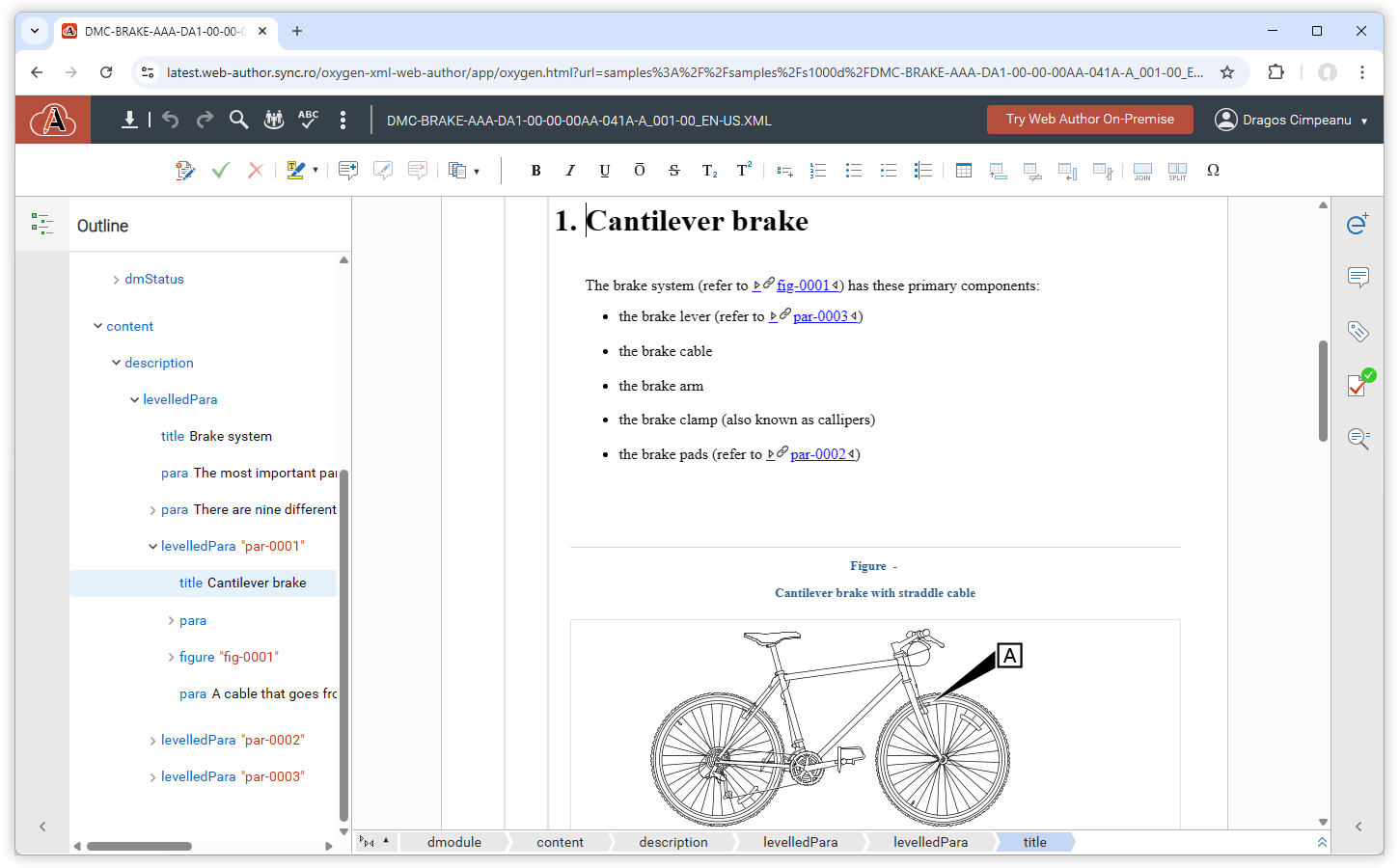
The built-in framework includes ready-to-use templates for common S1000D data module types, so authors can start from valid structures instead of building them from scratch. These templates help enforce the S1000D schema rules and reduce the risk of structural errors during authoring.
Smart Paste is also available when editing S1000D content in WebAuthor. When you paste content from external sources (such as Word documents, web pages, or plain text), Smart Paste attempts to convert the pasted content into valid S1000D structures and elements, preserving as much semantic information as possible while maintaining validity.
The visual authoring mode presents S1000D elements using a user-friendly layout and labels, so authors can focus on the content instead of the underlying XML tags. Contextual actions, content completion, and validation feedback are integrated into the editing workflow to help ensure that data modules remain compliant with the S1000D specification.
For more details about the S1000D-related improvements in WebAuthor, see the What's New in Oxygen XML Web Author page.
You can try the S1000D support directly in WebAuthor by opening the online sample available here.
Conclusion
Oxygen XML Editor's built-in S1000D 4.x support, available both in the desktop application and in WebAuthor, delivers a comprehensive, production-ready authoring environment for aerospace and defense technical publications. Key benefits include:
- Zero-configuration setup with ready-made templates and schemas
- Schema-guided editing with inline documentation
- Visual authoring with S1000D-aware formatting controls
- BREX editing and Schematron conversion for business rule enforcement
- Smart Paste for accelerated content migration
- CGM illustration support for technical graphics
- Consistent S1000D authoring experience across desktop and web
Ready to streamline your S1000D authoring workflow? Download a free trial of Oxygen XML Editor or try Oxygen XML Web Author and experience the difference native S1000D support makes.
If you want more advanced S1000D editing features, you can ask some of our partners.
For more information: